Watch it update as you drill.
Running motor yield, dog leg needed from the bit and the projection to the bit update with every bit depth and RINC. See left/right, above/below and whether landing VS is short or long, before the next survey.
FOR THE DRILLING TEAM
Know what the next stand needs.
Running motor yield, dog leg needed from the bit and the projection to the bit, updating as the stand drills down. Not just at the next survey.
For directional drillers, drilling engineers and company men.
7 days free, then $9.99/month founders price · 33 of 33 spots leftfirst 33 sign-ups only$19.99/month · Cancel anytime
FOUNDERS CLUB · 33 SPOTS ONLY
33 of 33 spots leftOnly 33 founder spots at $9.99/month
Founders keep $9.99 for as long as they stay subscribed. When the last spot is taken, the price goes to $19.99/month.
WATCH IT WORK
Enter a survey and watch the bit projection, tool face and slide needed update on the spot.
Start your 7-day free trial ↗01 / SEE IT WORK
Explore actual CurveDrill screens. Watch running yield and DLN update as you drill, compare landing options and see the path back to your plan.
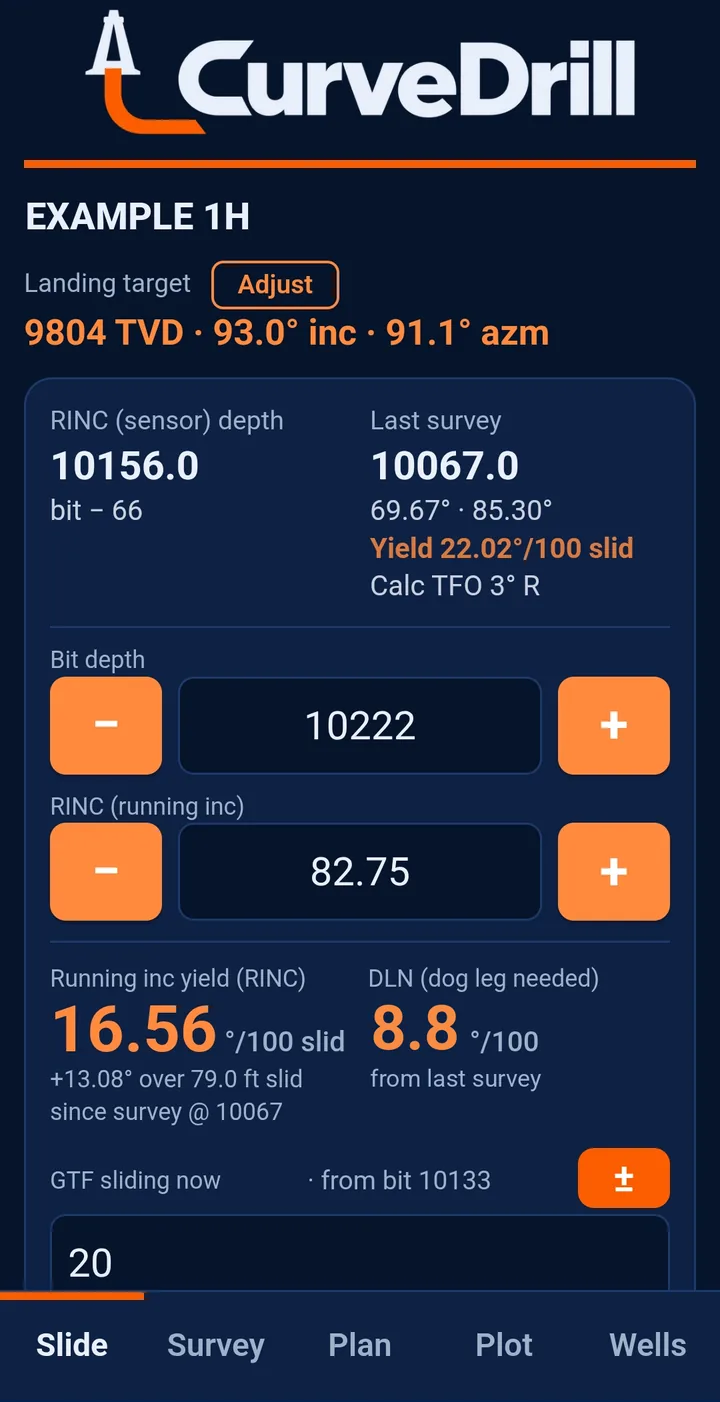
Tap the screenshot to view full size ↗Update bit depth and RINC as the stand drills down. Running motor yield, dog leg needed from the bit and the projection to the bit update right away, so you know if the motor is keeping up before the next survey.
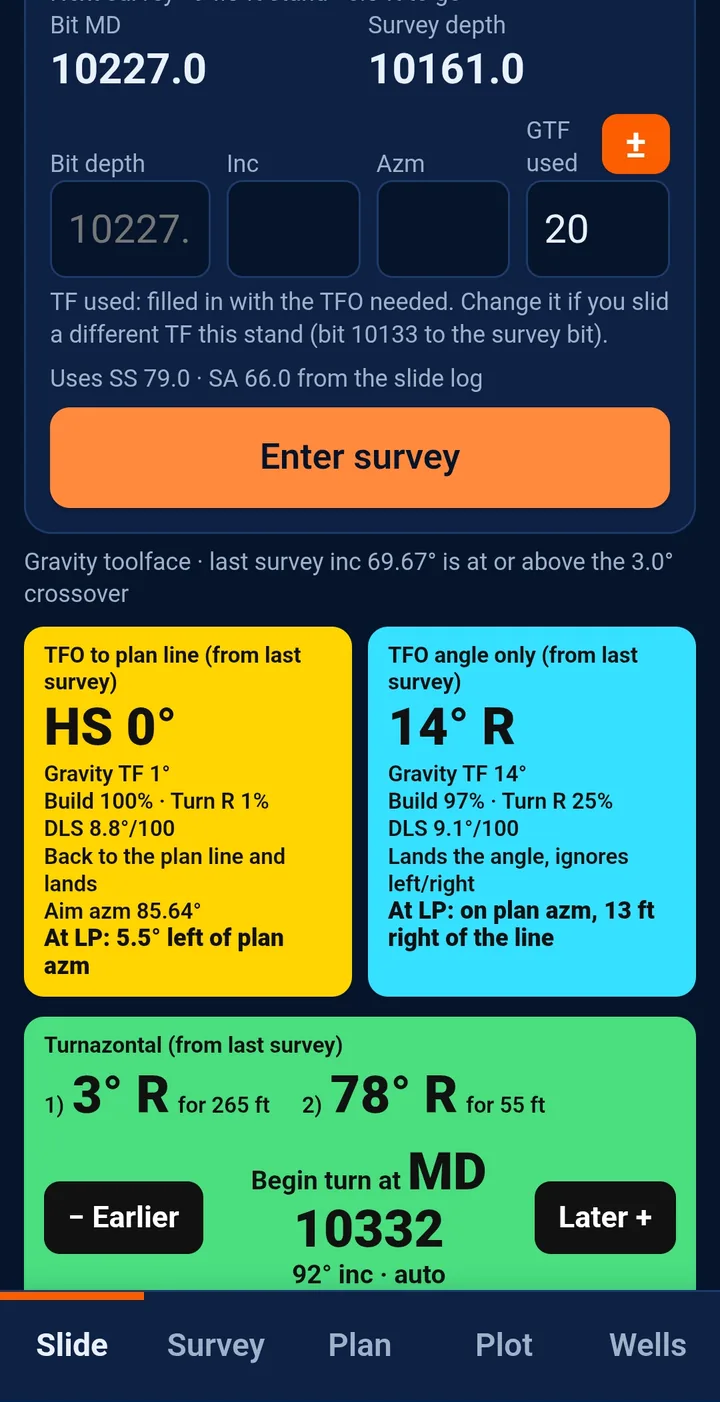
Tap the screenshot to view full size ↗Compare TFO to the plan line, angle only, or a Turnazontal S-turn in two tool faces. Move the turn point earlier or later and see the result right away.
 Tap the screenshot to view full size ↗
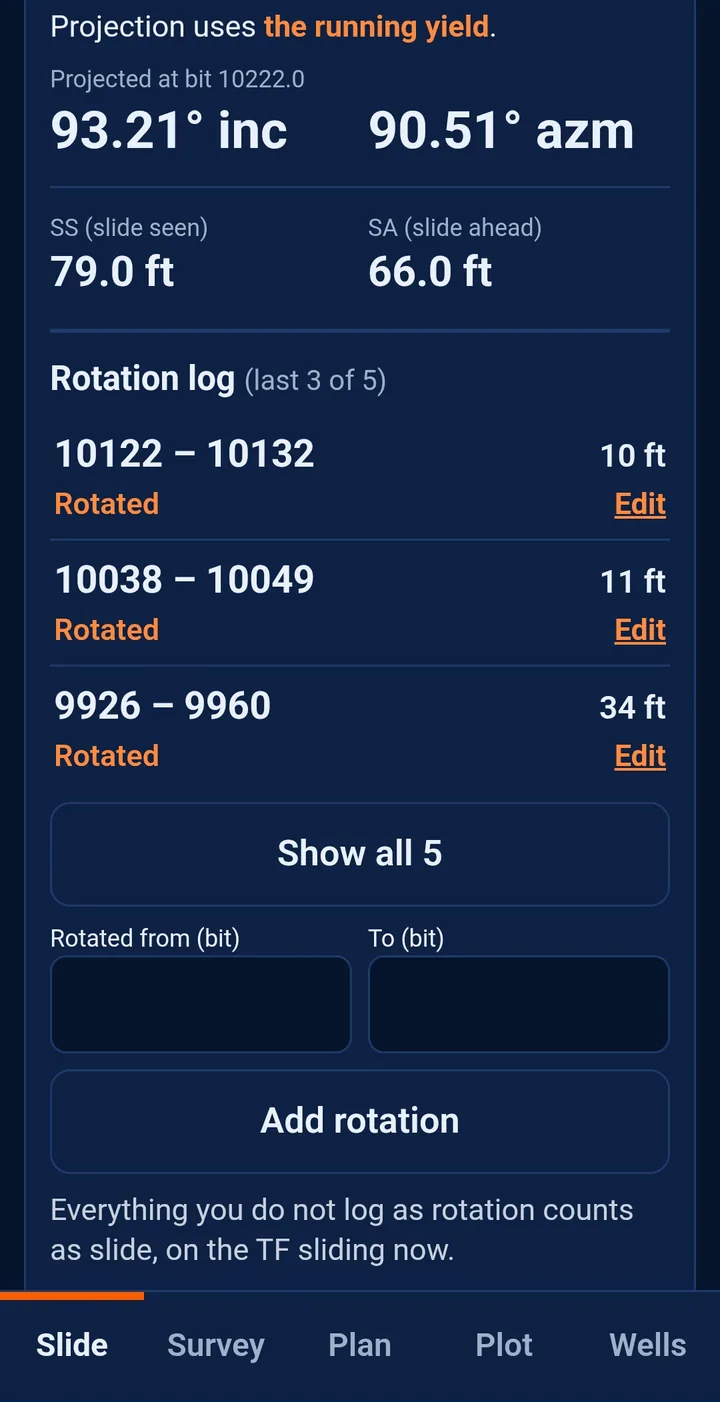
Log only what you rotated. Every other foot counts as slide, so slide seen, slide ahead, the yield and the bit projection stay current.
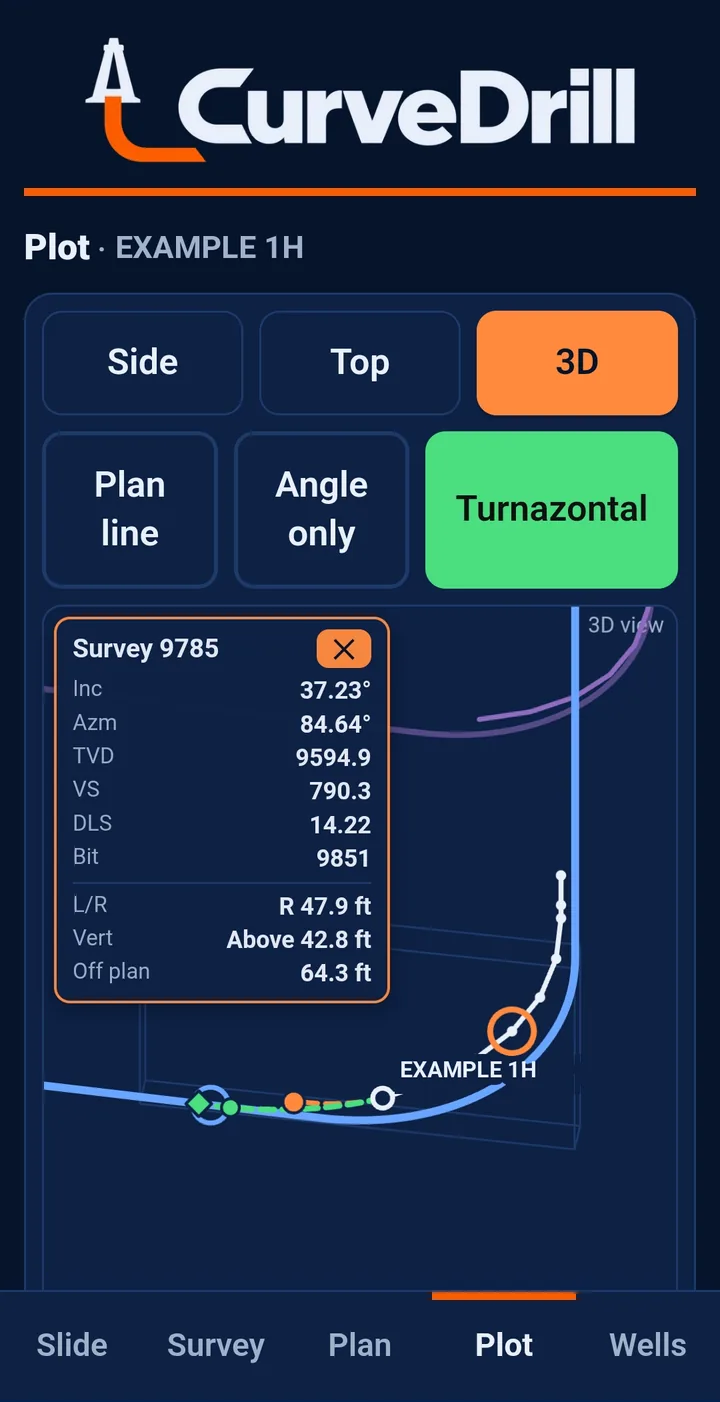
Tap the screenshot to view full size ↗Side, top and 3D views of the plan, your surveys, the projection to the bit and the path to landing. Tap any survey to see its numbers and distance from plan.
 Tap the screenshot to view full size ↗
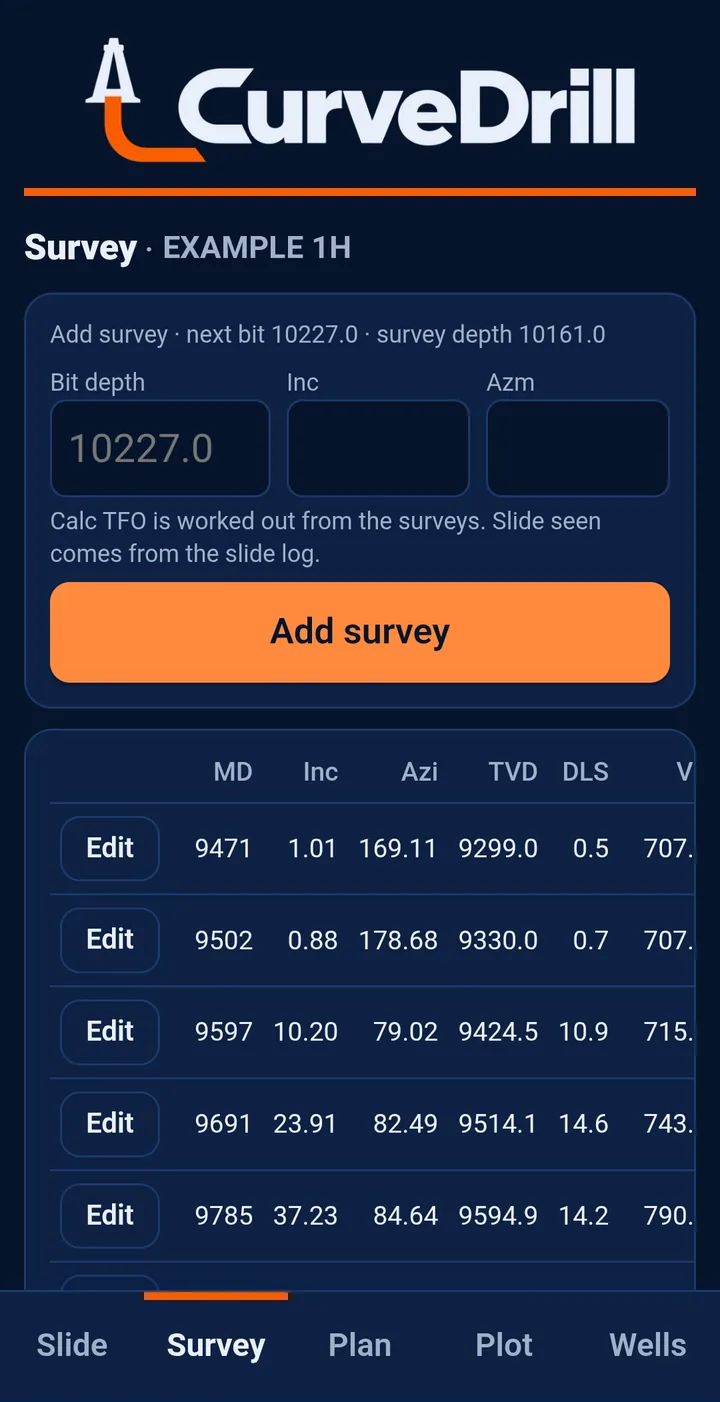
Enter surveys by bit depth and CurveDrill subtracts the sensor offset. Edit any survey and everything downstream recalculates.
 Tap the screenshot to view full size ↗
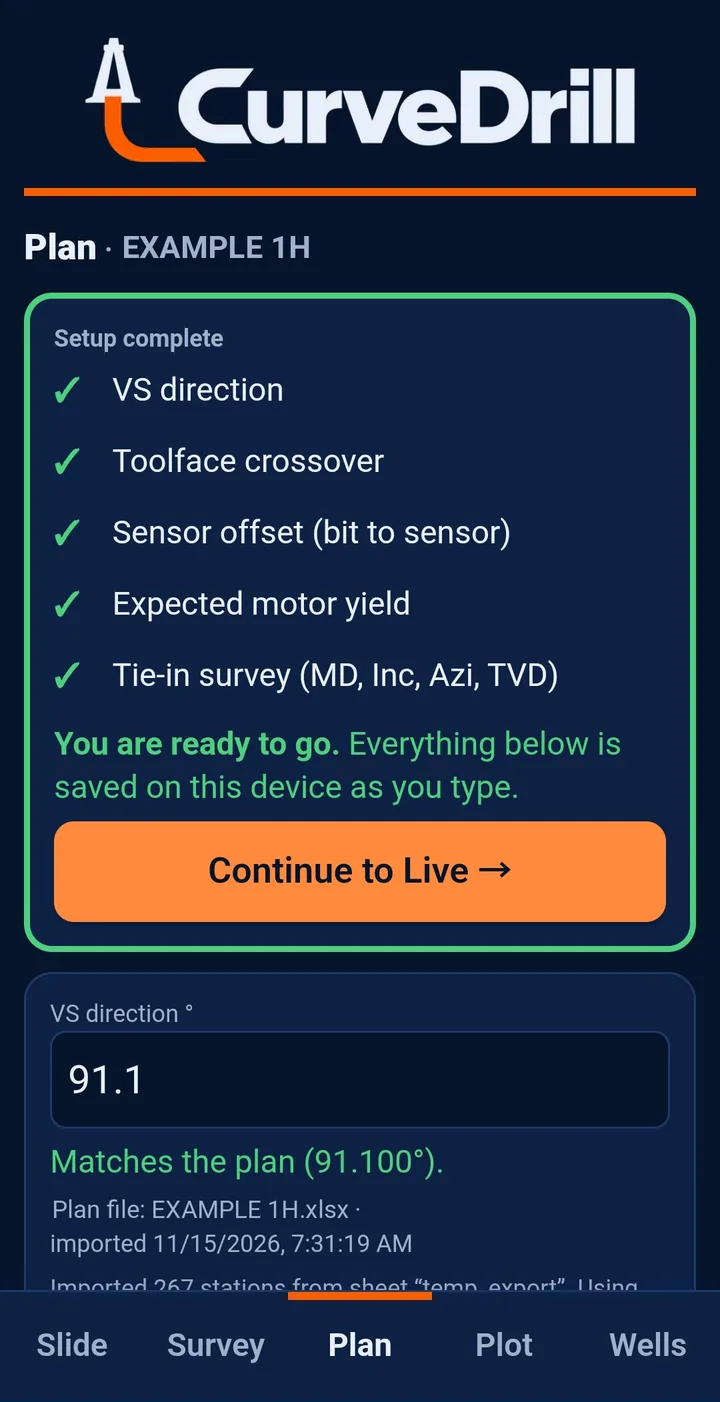
Import your Excel plan, then the setup checklist shows what is left: VS direction, toolface crossover, sensor offset, expected motor yield and tie-in.
Actual CurveDrill screens from a test well, shown for illustration. Guidance changes with your plan, surveys and rotation log.
02 / LESS SEPARATE MATH
Running motor yield, dog leg needed from the bit and the projection to the bit update with every bit depth and RINC. See left/right, above/below and whether landing VS is short or long, before the next survey.
Log only what you rotated. Every other foot counts as slide, so slide seen, slide ahead and motor yield stay current for the next stand.
Import Excel plans in feet or metres, set your sensor offset and stand length, and keep multiple wells on the phone you already carry. Each well runs in feet (°/100 ft) or metres (°/30 m).
03 / PRICING
Plan import, surveys, slide history and landing guidance for the people drilling the curve and the people reviewing it—on a phone, tablet or computer.
Check out in about a minute. Your license is linked to your email automatically and you land right in the app.
Open CurveDrill and sign in with the email you used at checkout. We email you a 6-digit code, no license key to keep track of. Where supported, add it to your Home Screen or install it as a web app.
Import Excel, set your offset, enter your survey and review the next stand.
$9.99$19.99 USD / month
7 days free · cancel anytime
33 of 33 founder spots leftFounders price: first 33 sign-ups
Founders keep $9.99/month (or $99/year) for as long as they stay subscribed. When all 33 are claimed, the price goes to $19.99/month or $199/year.
Have a referral code? Enter it at checkout.
7 days free, then the founders price of $9.99 USD billed monthly or $99 USD billed yearly, kept for as long as your subscription stays active. If you cancel and sign up again later, the price at that time applies.7 days free, then $19.99 USD billed monthly, or $199 USD billed yearly. Tax included. A card is required to start the trial. Cancel before the trial ends and you will not be charged.
Already have a license? Open CurveDrill ↗02 / WHAT’S IN THE APP
The tools for the whole curve job, in a format made for the phone you carry.
03 / CURVEDRILL & THE OUIJA BOARD
A basic paper or spreadsheet Ouija Board answers one geometry question at a time. CurveDrill connects that next decision to your plan, surveys, slide history and landing target.
Swipe the table to compare both columns →
| On the job | Basic Ouija BoardPaper or standalone spreadsheet | CurveDrillOn your phone |
|---|---|---|
| The next stand | One geometry answer per setup: a tool face or a change in inclination and azimuth. | Tool face, build rate, dog leg and slide needed to land. |
| Your well plan | Compare the result with your plan separately. | Import Excel plans. See left/right, above/below and landing VS short or long. |
| While the stand drills down | Nothing new until the next survey. | Running motor yield, DLN from the bit and bit projection update as you drill. |
| Projection to the bit | Work it out separately. | Built in from the last survey, rotation log, bit depth and running inclination. |
| Motor yield & slides | Calculate yield and keep the slide record separately. | Per-survey and running motor yield. The rotation log feeds slide seen and slide ahead. |
| Tool face options | Set and read for the individual geometry question. | Two options on screen: back to the plan line, or angle and direction only. |
| Calculation method | Dog leg geometry for one step at a time. | Minimum curvature across the well, recalculated at each survey. |
| Where you use it | Paper, a spreadsheet or a laptop. | On your phone, installed like an app. Works offline once installed. |
Desktop Ouija modules within rig-site planning software can connect to a plan and slide sheet. This comparison describes a basic standalone workflow. CurveDrill brings the rig-floor part of that job to your phone.
READY FOR YOUR NEXT CURVE?
For the driller on the rig floor, the engineer reviewing the plan, and the company man following the curve.
7 days free, then $9.99/month founders price · 33 of 33 spots leftfirst 33 sign-ups only$19.99/month · Cancel anytime